Meal Planning That Actually Works for Real Families
The Pick 3 method for weekly meal planning — three dinners, not seven, plus how the family planner, grocery list, and Health logging fit together.
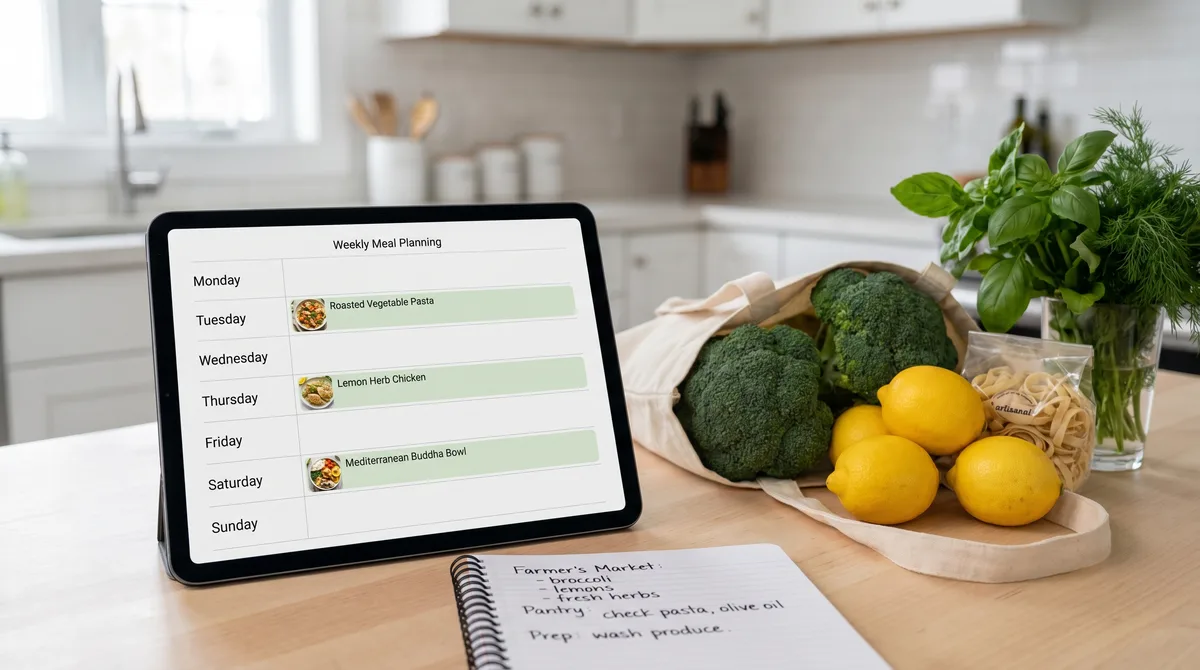
Most meal planning advice is written by people whose lives don't have toddlers, soccer practice, late meetings, or surprise dinner guests. They sketch out a flawless seven-day plan on Sunday afternoon and tell you to follow it, and by Thursday you've ordered takeout twice and the plan is in the bin. The reason isn't that you have bad discipline. The reason is that the plans were built for an imaginary week.
This guide is about meal planning that survives contact with a real household. Forktastic's Pick 3 method, the family-shared planner, the one-click grocery list, the Instacart hand-off, and Apple Health / Health Connect logging — all of it organized around how a real week actually goes.
Pick 3, not 7
The single best change you can make to your meal planning is to plan three dinners a week instead of seven. Not three meals total — three deliberate, planned, "I have the ingredients and I'm cooking this" dinners. The other four nights are open: leftovers, takeout, a defrosted thing, breakfast for dinner, dinner at the in-laws.
Three is the number because it survives life. You skip one because the day went sideways and you still ate two of three planned meals. The week feels like a success instead of a failure. The Pick 3 method, in detail.
In Forktastic, Pick 3 is the default weekly view. Add three recipes to the week and the rest is open. The mental load disappears.
Plan together — toggle Personal / Family
If you cook with other people in your house, the planner has a Personal / Family toggle. Personal is what you'll eat — useful for single-household cooks or when you're tracking your own nutrition. Family mode plans for the household and shares the plan with everyone in the family group, so partners and kids see the same week. Family Sharing setup is the prerequisite — covered in the family pillar guide.
Build the grocery list from the plan
Once three recipes are in the plan, the grocery list is one tap away. Forktastic pulls every ingredient from the three recipes, deduplicates against what you already have (when you mark items "have"), and you can add one-off items the recipes don't cover — paper towels, toothpaste, whatever. The meal plan → grocery list walkthrough.
The list is family-shared by default, so anyone in the household can add or check off items in real time. This is the single most-used feature in Forktastic by minutes-of-use, and the reason it exists is because we kept buying the same milk twice in our own house.
One-tap Instacart hand-off
For households that delegate grocery shopping to delivery, the entire list pushes to Instacart in one tap. Quantities, brands where specified, and you're at checkout. The Instacart walkthrough.
If you shop in-person, the same list works in-store on your phone with the items in cart-order. Tap to check off, the rest of the household sees what's done.
Dietary restrictions, allergens, picky eaters
The planner respects dietary tags and allergens captured during onboarding for every family member. If one member is gluten-free and another has a tree-nut allergy, recipes that violate either constraint are flagged before they enter the plan. The dietary-restriction guide covers gluten-free, vegan, vegetarian, dairy-free, and the allergen filter. The picky-eater workflow is its own post.
Batch cooking and prep-day workflows
Pick 3 pairs naturally with one weekly batch-cooking session. Cook a big pot of something on Sunday, build two or three of the week's planned dinners around it. The planner doesn't care whether the "recipe" is a fresh cook or a planned reheat. The full prep-day workflow.
Log to Apple Health / Health Connect (optional)
For households tracking nutrition for medical, athletic, or just curiosity reasons, Forktastic logs cooked recipes to Apple Health on iOS and Health Connect on Android. The macros come from the recipe itself — calories, protein, carbs, fat, fiber. No manual re-entry into MyFitnessPal, no separate food-log app. Apple Health setup. Health Connect setup.
The Sunday-night-to-Wednesday-night flow
For a household using the full workflow, a real week looks like this:
- Sunday afternoon, 10 minutes: Pick 3 recipes for the week in the family planner.
- Sunday, immediately after: Build the grocery list from the plan, add one-off items.
- Sunday evening: Send the list to Instacart for Monday morning delivery, or take the list to the store.
- Monday-Wednesday-Friday: Cook the three planned meals. Voice cook mode for the actual cooking. Log to Health if you track it.
- Tuesday / Thursday / weekend: Eat whatever. The plan is done.
That's the entire system. Ten minutes of planning on Sunday, three deliberate cooks during the week, no shame for the open nights.
Where to go next
If you cook with other people, start with family recipe management first — the planner only really shines when it's shared. If you want to know what the cooking experience looks like, jump to voice cook mode. And if you're still picking between apps, here's the honest 2026 comparison post.