Recipe Safari Extension for iOS: Save Recipes While You Browse
One-tap recipe saving from Safari on iOS — install the Forktastic Safari extension and stop switching apps every time you find a recipe.
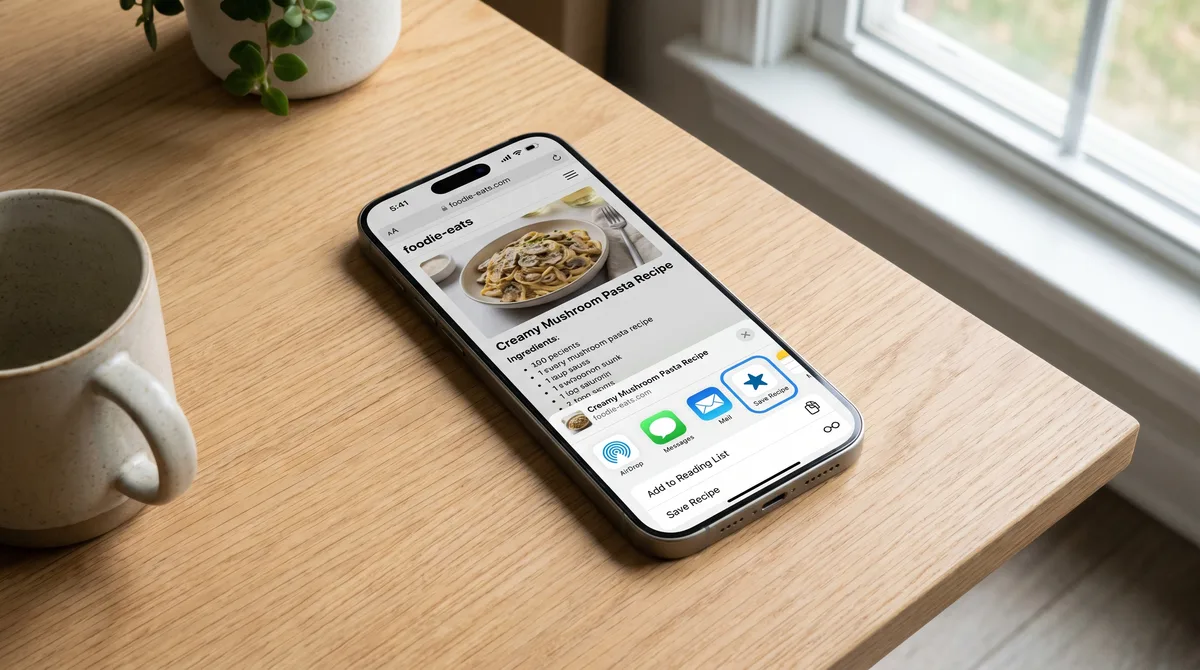
The Forktastic Safari extension on iOS adds a single button to your browser that saves any recipe page directly into your Forktastic library. Once installed, the friction between "I see a recipe I like" and "it's in my library" is one tap.
Why this matters more than it sounds
Most recipe-import friction happens because you have to switch apps. You see a recipe in Safari, copy the URL, switch to Forktastic, paste, save. The four steps don't feel like much in isolation, but multiplied by every recipe you ever want to save, it's the difference between a library that grows and a library that doesn't.
The Safari extension cuts this to one tap inside Safari. You stop switching apps. You stop losing track of which URL belonged to which tab.
Installing the extension
- Install Forktastic from the App Store. The extension is bundled with the main app.
- Settings → Safari → Extensions. Find Forktastic in the list, toggle it on.
- Grant the extension permission to read pages — required so it can parse recipe data from the page you're on.
- Open Safari, visit any recipe page. The Forktastic icon appears in the share sheet.
Using it
On any recipe page in Safari:
- Tap the share icon (bottom of Safari).
- Tap Forktastic.
- Confirm Save.
The recipe imports in 2-3 seconds. You don't leave Safari. If you want to keep reading after saving, you can.
What the extension does differently from manual URL import
Same parser, same result. The extension just removes the app-switch step. If you only save a couple of recipes a month, the difference is small. If you save a few per week, the time saved compounds.
iPadOS
The extension works identically on iPadOS — Safari → share → Forktastic. Useful when you're reading recipes on the iPad in the kitchen.
What about Chrome on iOS?
Chrome on iOS uses WebKit under the hood like Safari but doesn't expose extension APIs in the same way. The Forktastic extension is Safari-only. From Chrome, copy the URL and paste into Forktastic's URL import — same end result, one extra tap.
Android equivalent?
Android doesn't have the same browser-extension model. The Forktastic Android app registers as a share target — so from any browser, tap share → Forktastic → save. Functionally equivalent to the iOS Safari extension.
Where to go next
For the full URL import flow, URL import walkthrough. For broader import methods, the import pillar.