Photo Match: Use AI to Find Recipes from a Picture of Your Fridge
Photo Match in Forktastic — take a photo of your fridge, get recipes from your library that match. What it identifies well and what it doesn't.
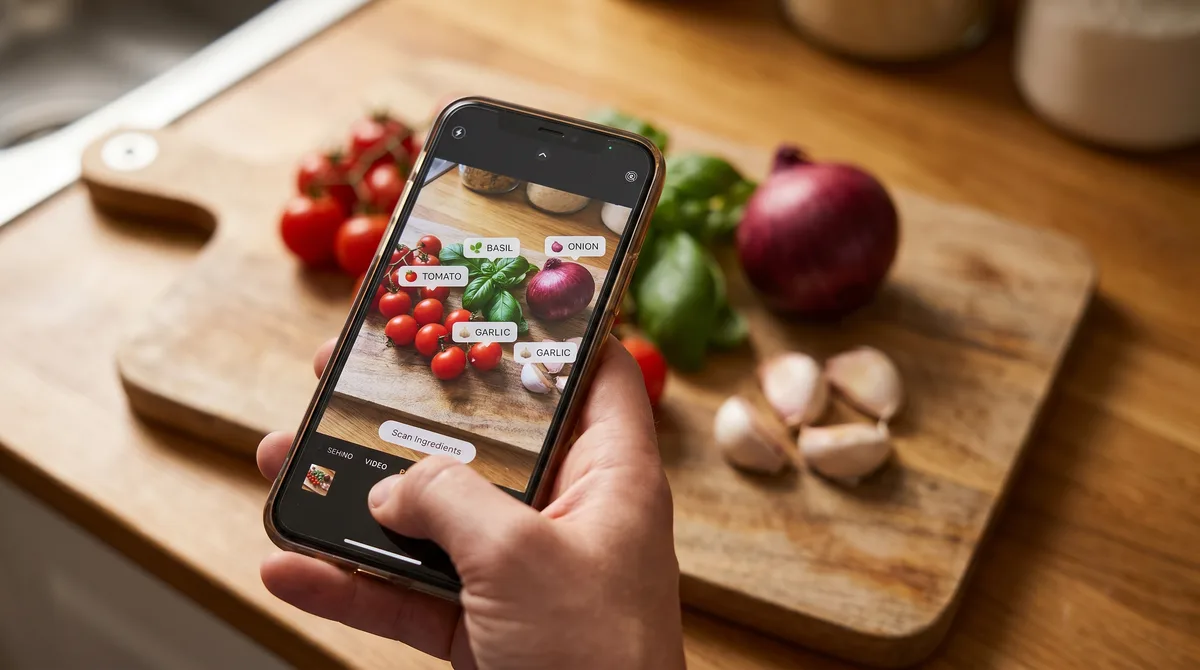
Photo Match is one of Forktastic's Pro features and probably the most fun one to demo. Open your fridge, take a photo of what's in there, and Photo Match identifies the ingredients and surfaces recipes from your library that use those ingredients. It's the answer to "what can I make tonight" rather than "save this recipe for later."
The distinction that matters
Photo Match is a discovery feature, not an import feature. It doesn't create a recipe from a photo. It identifies ingredients in a photo and searches your existing recipe library for matches. So Photo Match's quality depends on two things: how accurate the ingredient detection is (very accurate for common ingredients), and how big your library is (the bigger the library, the better the recipe suggestions).
How it works, end to end
- Open Photo Match in Forktastic.
- Take a photo of the ingredients you have — fridge interior, counter, vegetable basket. Photo Match works best with clear, well-lit photos. Top-down shots are easier to parse than angled ones.
- Wait 2-3 seconds. The AI returns a list of identified ingredients with confidence scores.
- Confirm or edit the list. Tap to remove false positives or add ingredients the AI missed.
- Get recipe matches. Forktastic searches your library for recipes that use the most of the identified ingredients. Best-match recipes appear first.
What it identifies well
Common produce (tomatoes, onions, garlic, peppers, leafy greens, herbs, fruits), packaged staples (rice, pasta, beans, eggs, milk, butter), and most cuts of meat. Confidence is high enough that you can usually accept the detected list without edits.
What it struggles with
Highly processed items in similar packaging (different yogurt flavors), uncommon ingredients (unusual specialty cheeses, regional spices), items hidden behind other items, and bad lighting. For these, edit the detected list to add the items the AI missed.
What Photo Match is not
It's not a recipe-from-photo generator. It doesn't invent recipes that match your ingredients — it finds recipes that already exist in your library. For invented recipes, Forktastic's AI Recipe Generation feature is the right tool.
It also doesn't auto-add items to your grocery list. If you take a photo and notice you're missing one ingredient, you add it manually.
Pro feature
Photo Match is gated behind Pro. The free tier includes the same 10-recipe library that everything else is gated against — Photo Match doesn't have meaningful matches against a 10-recipe library anyway, so the gating is more about library depth than feature paywall.
Where to go next
For other import / discovery methods, the import pillar. For how Photo Match interacts with weekly meal planning, the meal planning pillar.